deckery-tray
Repository: Plasma-Deckery/deckery (bundled in the main repo, under tray/)
System tray applet that monitors and controls the full Deckery stack from a single icon in the KDE panel.
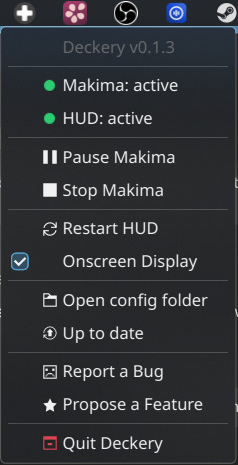
What it does
- Service status — live display of the running state of makima and the HUD in the tray menu
- Pause / Resume — sends
pause/resumeover the makima IPC socket without restarting the service - Restart / Start / Stop — controls makima and deckery-hud via systemd user units
- Controller Bindings — submenu listing all known configs with live status, modules indented under the base config they apply to; modules and app overrides toggle with a checkbox, mutually exclusive modules are a submenu of radio items instead; a row with a problem carries
⚠️or🛑and opens a scrollable dialog on click - Updates — "Search for Updates" entry pulls all repos and re-runs the installer
- Config folders — "Open my configs" and "Open shipped configs" open either directory in the file manager
- Steam Input — shows whether Steam's Desktop Input is disabled (green) or still active (yellow); clicking the yellow indicator opens a terminal that writes the configset entry and optionally restarts Steam
- Tooltip — always shows "Deckery" on hover for quick identification
Tray icon states
| Icon | Condition |
|---|---|
| 🟢 Green | All services active, no errors |
| 🟡 Amber | Any service not fully active; makima paused; makima reinitialising after device reconnect/resume (lifecycle: "starting" or "reinitialising"); Steam Input still active |
| 🔴 Red | Any service failed; no device found (errors.no_device); base config parse error (errors.base_config) |
| 🎮 Gaming | Gaming Mode active (overrides amber) |
Architecture
Built with GTK3 + AyatanaAppIndicator3. Runs inside the deckery distrobox container, launched via the deckery-tray-launch wrapper script.
Service hierarchy:
plasma-core.target  ← KDE-only, not active in Gamescope/Gaming Mode
    └── deckery-tray.service  ← owns the distrobox container, starts on login
            ├── makima.service       (BindsTo tray — cannot run without it)
            └── deckery-hud.service  (BindsTo tray — cannot run without it)
deckery-tray.service is bound to plasma-core.target (a KDE-specific systemd target that is not active in Gamescope/Gaming Mode). An ExecCondition guard additionally confirms that plasma-plasmashell.service is running before the tray starts — if the check fails, the service is skipped cleanly without triggering a restart loop. This means Deckery does not start in Gaming Mode and does not interfere with Gamescope.
deckery-tray.service runs podman start deckery before launching the tray, ensuring the container's main conmon process always lands in the tray's cgroup. This makes the tray the true owner of the container — stopping the tray stops everything cleanly.
State tracking:
| Source | Used for |
|---|---|
systemctl --user is-active |
Running state of makima and deckery-hud |
$XDG_RUNTIME_DIR/makima-state.json |
paused, lifecycle, errors, configs |
$XDG_RUNTIME_DIR/makima-control.sock |
Sending IPC commands (pause / resume, config enable\|disable, config group enable\|disable) |
configset_controller_neptune.vdf |
Steam Input configured state (polled every 2 s) |
Status updates run on a background thread to keep the GTK main loop responsive. A Gio.FileMonitor on makima-state.json triggers an immediate debounced refresh (120 ms window) whenever the file changes — pause state changes appear in the menu within milliseconds.
Makima service menu item displays a per-state label based on state.json:
| Condition | Dot colour | Label shown |
|---|---|---|
| Gaming Mode | gaming | Gaming Mode |
| paused | amber | paused |
lifecycle is "starting" or "reinitializing" |
amber | reinitializing… |
errors.no_device present |
red | no device |
errors.base_config present |
red | config error |
| ready, no errors | green | active |
The row is checked in that order, so Gaming Mode and a pause outrank a startup in progress.
Both red states append — click for details, and the row opens the message
makima wrote behind them: which [device] names list to check, or which file
failed to parse. The two words alone cannot carry that, and the row is
clickable in every state — greying it out would read as "unavailable", and a
click with nothing to report does nothing.
When errors.no_device is set, Pause Deckery is hidden from the menu — pausing an input mapper that has no device is meaningless.
Controller Bindings submenu (config_menu.py):
The submenu is managed by a dedicated ConfigSubmenu class in tray/config_menu.py. It holds one permanent slot per config name (a CheckMenuItem/MenuItem pair). Slots are created at startup from the initial state.json read; if a new config appears at runtime a slot is appended live. Slots are never destroyed — they are hidden when their config is absent.
Members of an exclusive_group get a RadioMenuItem instead, inside a submenu
of their own whose parent item names the active member ("KDE Desktop Layout:
Vertical"). A submenu is what says "one choice" whatever the panel does with
radio items, and folding the members away costs nothing, because the heading
already says which one is on.
Two GTK details shape that code:
- An item carrying a submenu draws no checkbox through dbusmenu, and a click opens the submenu rather than toggling. The group's own on/off switch therefore sits inside it, as the first entry.
- A radio item cannot be cleared:
set_active(False)on the one that is on does nothing, because GTK will not leave a radio group with nothing selected. A switched-off group would keep showing a ticked member. Each group therefore owns an extra radio item that is never appended to any menu — selecting it is invisible and clears every member.
Live updates work via dbusmenu property propagation: label, active state, and visibility changes always reach the panel. Structural additions use append() (not insert()) because dbusmenu only propagates append() to already-cached submenus.
Related
- makima-deckery — produces the state JSON and IPC socket
- deckery-hud — managed by the tray as a dependent service