Deckery
The Steam Deck is a genuinely capable handheld computer. Deckery's goal is to get the most productive and efficient workflows out of it — making full use of the unique combination of touch, trackpads, and controller buttons on the input side, while also shaping the OS to work well in this input mode and on the small screen. The goal is fast and intuitive control of the device — without needing an external keyboard and without relying on the Steam application running.
Usage
Deckery runs as a set of background services. After installation, Deckery appears in your application launcher — opening it starts the system tray icon.
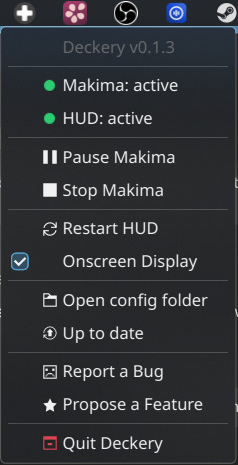
The tray icon shows service status at a glance and gives quick access to:
- Pause / Resume controller remapping (makima)
- Restart individual services if something goes wrong
- Enable / Disable the on-screen display overlay
- Open config folder to edit your button mappings
- Search for updates
Press the left stick on your Steam Deck to open the HUD overlay — it shows exactly what every button does in the current context, live.
→ Setup Guide · Configuration · Progress & Challenges · Projects